
VisionTek VT4950 USB-C DisplayLink Docking Station with KVM Switch for Dual Laptops - Hybrid Workstation Triple Monitor Dock with HDMI & DisplayPort - 100W Laptop Charging for Windows and macOS
for Notebook, Keyboard, Mouse, Monitor, Desktop PC - 230 W Power Supply - USB Type C - 3 Displays Supported - 4K - 4096 x 2160, 3840 x 2160 - 7 x USB Ports - 2 x USB 2.0 - 2 x USB Type-A Ports - USB Type-A - 3 x USB Type-C Ports - USB Type-C - 1 x RJ-45 Ports - Network (RJ-45) - 1 x HDMI Ports - HDMI - 2 x DisplayPorts - DisplayPort - Wired - Gigabit Ethernet - Windows 11, Windows 10, Windows 8.1, Windows 7, Mac OS X 10.10 Yosemite, ChromeOS - 100W USB Power Delivery
About This Product
Overview
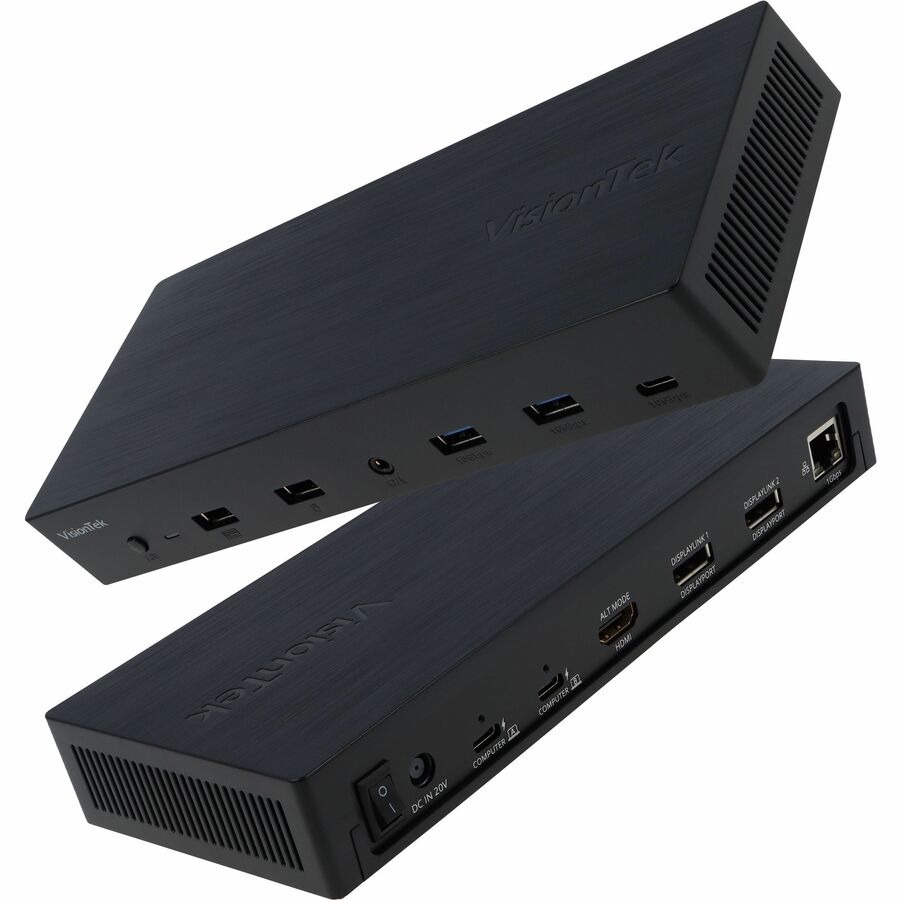
The VisionTek VT4950 is a hybrid workstation dock built for dual-laptop users who need a clean, flexible setup. With DisplayLink powered multi-monitor support, integrated KVM switching, and up to 100W USB-C power delivery, it helps you connect, charge, and switch between work and personal systems from one desk.
- Universal compatibility with USB-C, Thunderbolt™ 3 and Thunderbolt™ 4 systems
- Full compatible with M1 and M2 Mac
- Supports up to 3 external displays
- KVM Switching between two systems
- Up to 100W USB-C Power Delivery for two systems*
- 2 x USB-A 3.1 Gen 2 Ports 10Gbps
- 1 x USB-C 3.1 Gen 2 Port 10Gbps
- 2 x DisplayPort 1.4
- 1 x HDMI 2.0
- RJ45 Gigabit Ethernet Port
- Kensington™ Security Lock Slot
Quick Specifications
- Product Type
- Docking Station
- Connectivity Technology
- Wired
- Number of Displays Supported
- 3
- Supported Resolutions
- 4096 x 2160 3840 x 2160
- Screen Mode Supported
- 4K
- Device Supported
- Notebook Keyboard Mouse Monitor Desktop PC
- Ethernet Technology
- Gigabit Ethernet
- Host Interface
- USB Type C